The Key To Micro World!

Opto-Edu (Beijing) Co., Ltd.100043Why Us (指向 公司信息, 格式不好编辑, 另起一个页面Why Us)F-1501 Wanda Plaza, No.18 Shijingshan Road, Beijing 100043, ChinaOpto-Edu (Beijing) Co., Ltd.100043Why Us (指向 公司信息, 格式不好编辑, 另起一个页面Why Us)F-1501 Wanda Plaza, No.18 Shijingshan Road, Beijing 100043, ChinaOpto-Edu (Beijing) Co., Ltd.Opto-Edu (Beijing) Co., Ltd.Opto-Edu (Beijing) Co., Ltd.Opto-Edu (Beijing) Co., Ltd.Opto-Edu (Beijing) Co., Ltd.Opto-Edu (Beijing) Co., Ltd.Opto-Edu (Beijing) Co., Ltd.Opto-Edu (Beijing) Co., Ltd.Opto-Edu (Beijing) Co., Ltd.Opto-Edu (Beijing) Co., Ltd.Opto-Edu (Beijing) Co., Ltd.Opto-Edu (Beijing) Co., Ltd.Opto-Edu (Beijing) Co., Ltd.Opto-Edu (Beijing) Co., Ltd.Opto-Edu (Beijing) Co., Ltd.Opto-Edu (Beijing) Co., Ltd.Opto-Edu (Beijing) Co., Ltd.Opto-Edu (Beijing) Co., Ltd.Opto-Edu (Beijing) Co., Ltd.Opto-Edu (Beijing) Co., Ltd.Opto-Edu (Beijing

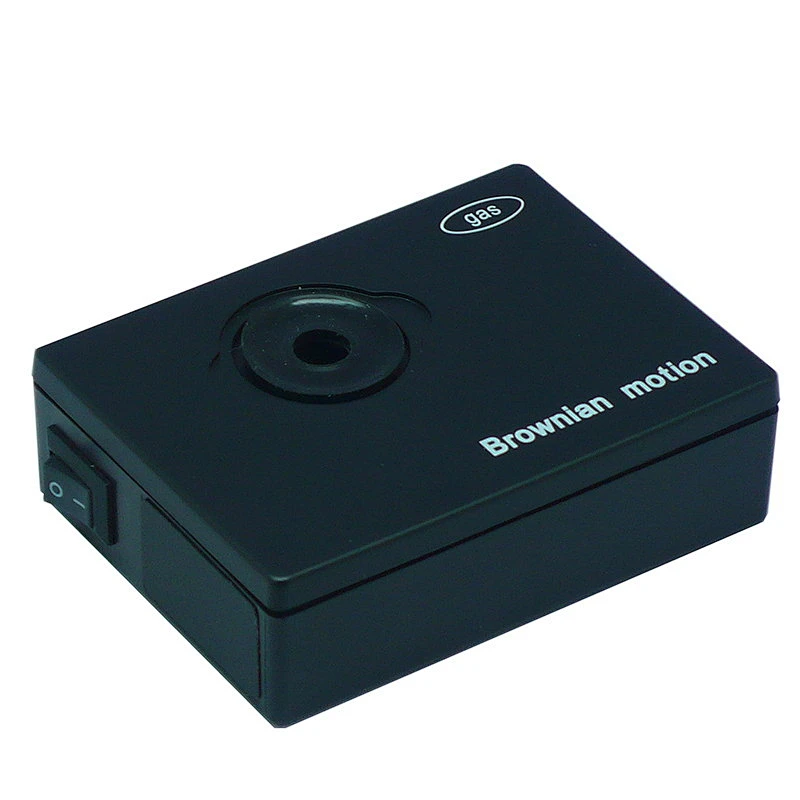
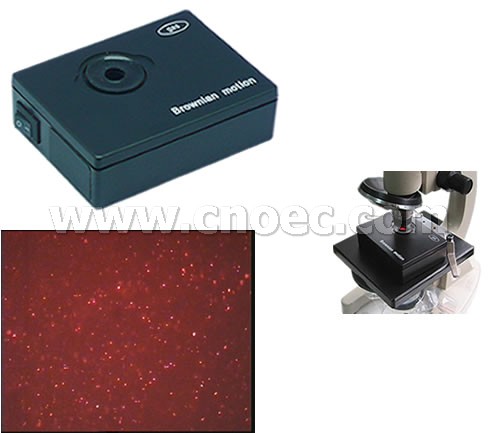
Brownian Motion Demo. (Smoke)

E14.6106

Like Favorites

Brownian Motion Demo. (Smoke)

Quantity:

Specification

Dimensions: 8x6x2.5
Power: 2 AA battery

Guide of Operation
1. Microscope ×10 objective lens and ×10 eye lens or ×10 objective lens and ×16 eye lens
2. Remove the glass lid of smoke cell and fill several drops of glycerin or clean water in the seal groove. Squeeze some smock with a straw into the smoke cell. Cover the glass lid on the smoke cell immediately and press it.
3. Switch on the power to light the smoke cell with red light of laser
4. Put the box on the platform of microscope and let the smoke cell directly under the objective lens. Slightly move the box for viewing access.
5. Slow raise the tube of microscope using it's knob and view from the eye lens until some bright tiny particles of smoke appear in your view. Adjust the microscope slightly to focus smoke particles clearly. You can view the random motion of smoke particles in the air of smoke cell.
online service

online service
We are here online to support!

Send Message

*
*
*
*
*
7
close
7

Service

Scan the QR code Close
qr code

INQUIRY LIST

Empty List

COMPARE

Empty List

Advanced Cookie Settings

Essential Cookies

These cookies enable core functionality such as security, verification of identity and network management. These cookies can’t be disabled.

Enable Marketing Cookies

These cookies are used to track advertising performance, consent to the sending of advertising-related user data to Google, and consent for the website to serve personalized advertising to provide more relevant services.

Enable Functional Cookies

These cookies collect data to remember choices users make to improve and give a more personalised experience.

Enable Analytics Cookies

These cookies help us to understand how visitors interact with our website, discover errors and provide a better overall analytics.

Essential cookies can't be disabled.